For accountants
The practice and your clients
Your work across every client, every client with who looks after it, and the team.
My work
Everything waiting on you across the clients you look after, overdue first: VAT returns to sign off or submit, open items blocking a return, months ready to close, lines to review, self-assessment orders, opening balances, and deadlines in the next 30 days. Open takes you straight to the right screen in that client’s books; All clients at the top brings you back. Show another person’s work, everyone’s, or the jobs nobody has been given.
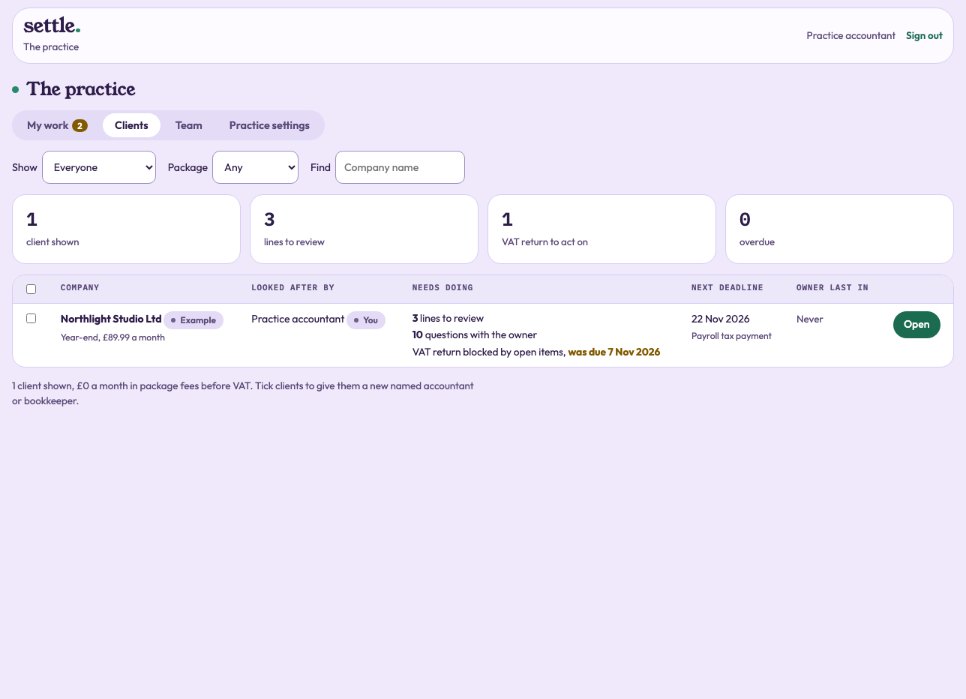
Clients
Every company with its package and fee, named accountant and bookkeeper, lines for review, items with the owner, VAT, the next deadline, work waiting and when the owner last signed in. Filter by person, package or name. Administrators tick clients to give them a new named accountant or bookkeeper.
Team
Each person’s caseload: clients as named accountant and as bookkeeper, fees looked after, work waiting, overdue, lines to review, time logged and last sign-in. Administrators can hand all of someone’s clients to a colleague, with their password.
Practice settings
Administrators invite someone to the practice as an accountant (signs filings) or a bookkeeper (keeps the books, signs nothing); everyone at the practice can open every client. Your own two-step sign-in and password are here too. Check connections tests each outside service for real. Administrators also open the admin area and the operations console from here.
Opening balances
When an owner gives starting balances in Set up, you see Post the opening balances. Post them as an opening journal, then press Mark as posted.
Still stuck? Ask in the Finance Helper inside the app, or contact your accountant.