Every day
The AI Finance Helper
The button in the corner: your to-do list, the Bookkeeper’s suggestions, and a chat.
Opening it
The green Finance Helper button sits in the corner of every screen, with a count of what needs you. It opens by itself once a visit when something is waiting.
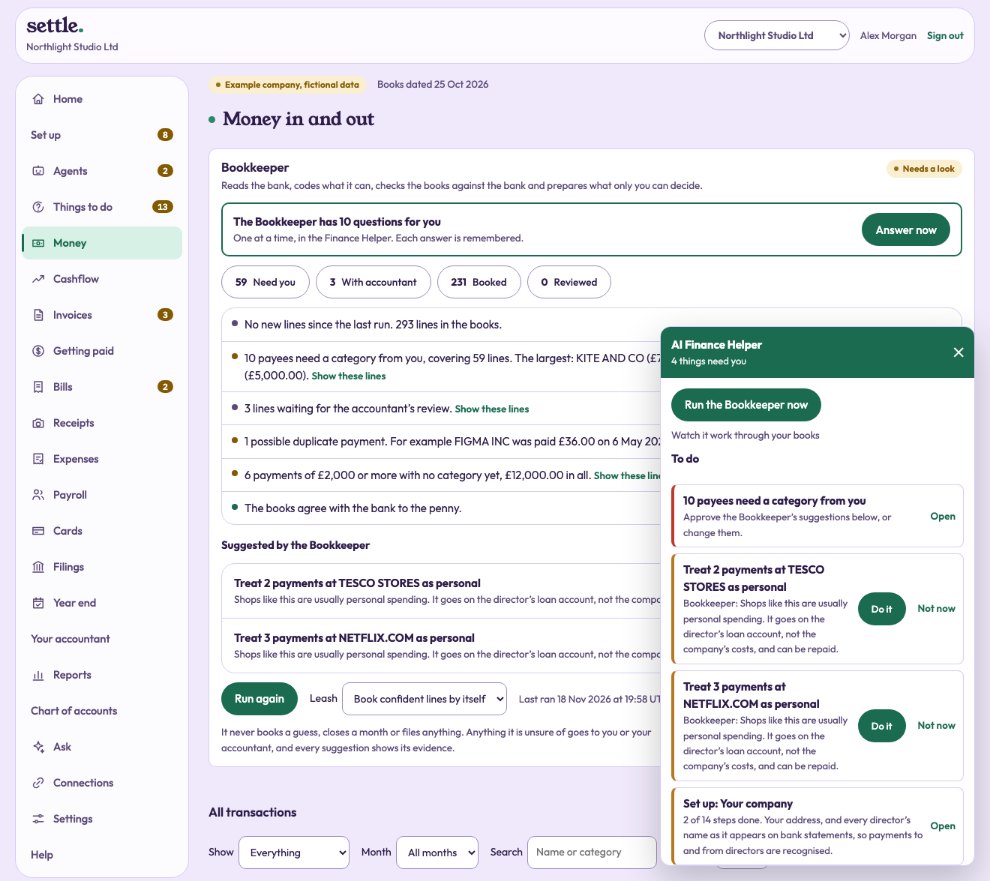
To do
Everything waiting on you: the agents’ suggestions (Do it, or Not now), the next set-up step, lines ready to book, items with your accountant, and deadlines in the next 30 days.
Suggestions to approve
Each payee the Bookkeeper is unsure of, with its best guess and reason. Approve it, Change it, or Approve all after checking the list.
The Bookkeeper is asking you
Its questions, one at a time. Tap a category, or tell it in your own words what the payee is; it is remembered for next time. Run the Bookkeeper now is here too.
Ask me anything, and what it has learned
Ask about your money and get an answer from your books. At the bottom, What I have learned shows how many payees it now books by itself, how often its suggestions were approved as they were, and where you corrected it.
Still stuck? Ask in the Finance Helper inside the app, or contact your accountant.