Money out
Expenses and mileage
Claim back money you spent or miles you drove, at HMRC’s rates.
Something I paid for
Give the date, what it was for, the kind of cost and the amount, tick that you have the receipt, and press Send claim. Add the receipt under Receipts.
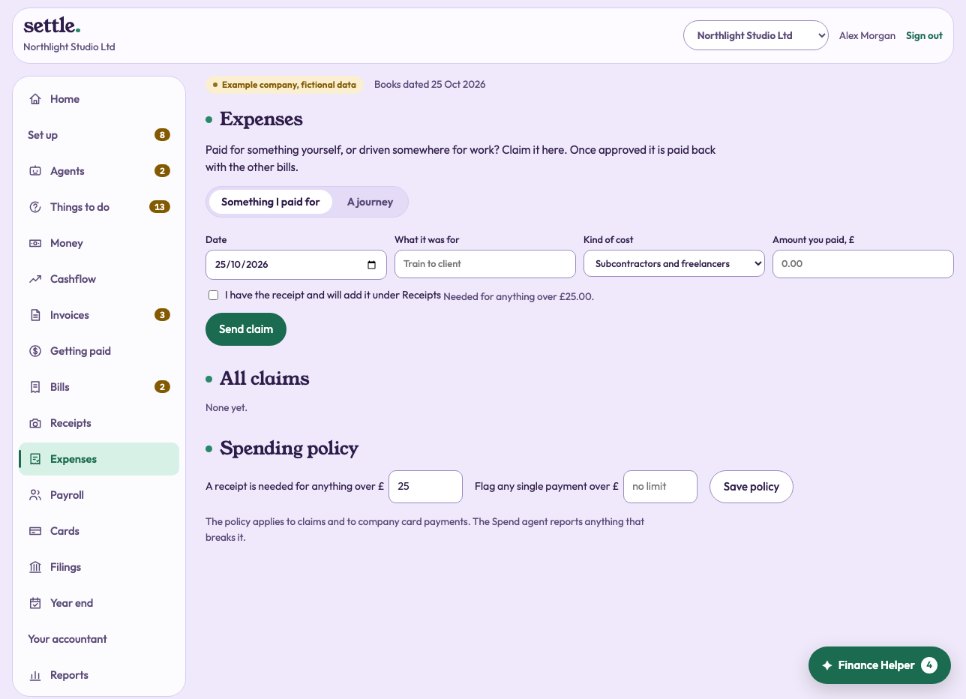
A journey
Give the date, what it was for, the miles, and how you travelled. HMRC’s approved rates are used: car or van 45p a mile for the first 10,000 business miles in the tax year, then 25p; motorcycle 24p; bicycle 20p. The miles you have claimed this tax year are shown.
Approval and paying back
The owner or your accountant approves or rejects each claim. An approved claim becomes a bill owed to the person, paid back with your other bills. Approving your own claim is allowed but marked Self-approved. You can withdraw a claim that is still waiting.
Spending policy
Set the amount above which a receipt is needed (£25 unless you change it), and a limit for any single payment. It applies to claims and company card payments, and the Spend agent reports anything that breaks it.
Still stuck? Ask in the Finance Helper inside the app, or contact your accountant.