For administrators
The admin area
Running the service: warnings, companies, people, email, activity and backups.
Getting there
Practice administrators see Admin area on the Clients page. The first accountant is an administrator, and there is always at least one.
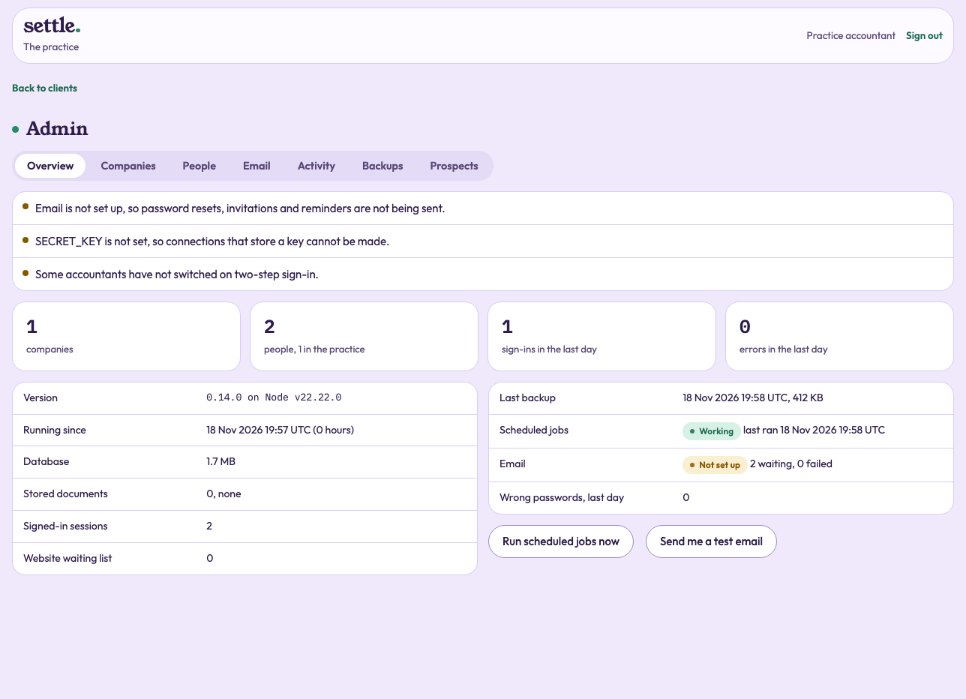
Overview
Warnings that need action (such as email not set up), the number of companies and people, sign-ins and errors in the last day, the last backup, and whether scheduled jobs and email are working. Run scheduled jobs now and Send me a test email are here.
Companies and people
Each company with its size, plan and connections: Open, Export or Remove (typing its name and your password; a backup is taken first). Each person: send a reset link, sign them out everywhere, unlock, edit, clear two-step sign-in, switch off, or remove.
Email, activity and backups
The outbox shows every message and whether it was sent. Activity can be filtered to errors, wrong passwords, admin actions, sign-ins, backups or scheduled jobs. A backup is taken once a day and the newest fourteen are kept; take one now, or download one with your password. A download is encrypted: open it with the decrypt-backup command and the live SECRET_KEY. Keep copies somewhere else as well.
Still stuck? Ask in the Finance Helper inside the app, or contact your accountant.