For accountants
VAT workpapers
Check each quarter, sign it, and submit it once the owner approves.
Each quarter
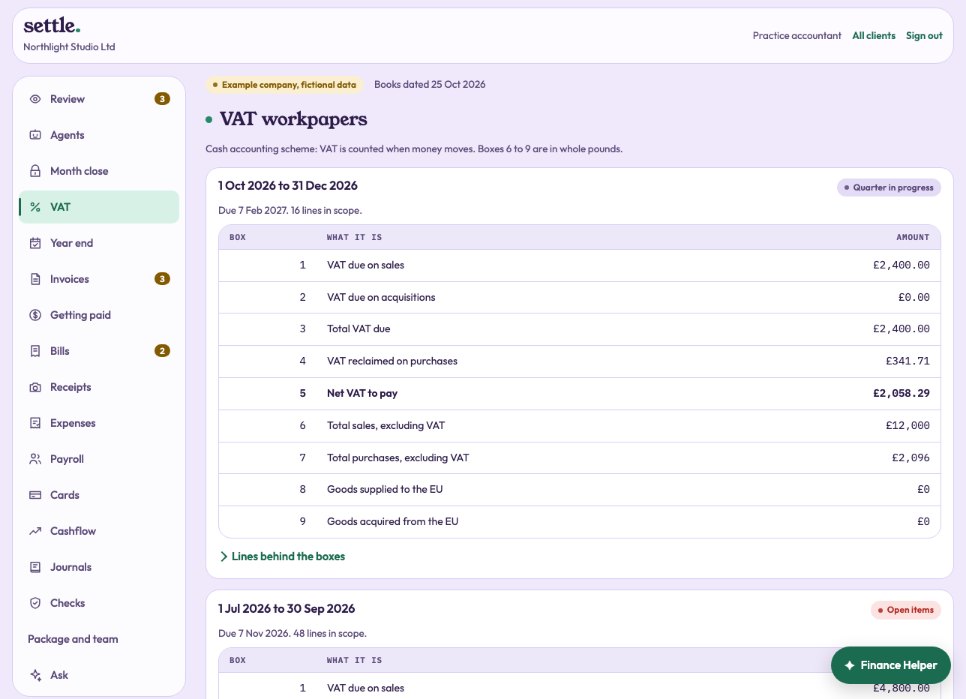
The nine boxes, the due date and the status, with Lines behind the boxes. A quarter with open items cannot be signed.
Signing
When it is ready, press Sign off as your name. The owner is emailed and approves it under Filings.
Submitting
Once approved, press Submit to HMRC now. This needs an HMRC connection (the company’s or the practice’s) and the VAT registration number in Settings. If you filed in other software, use Record a submission made elsewhere with HMRC’s receipt reference.
The scheme
Set cash or standard accounting under Settings; it cannot change while a return is part-way through sign-off.
Still stuck? Ask in the Finance Helper inside the app, or contact your accountant.