Money in
Getting paid
Automatic reminders, a pay-online button, and invoices that repeat.
Reminders
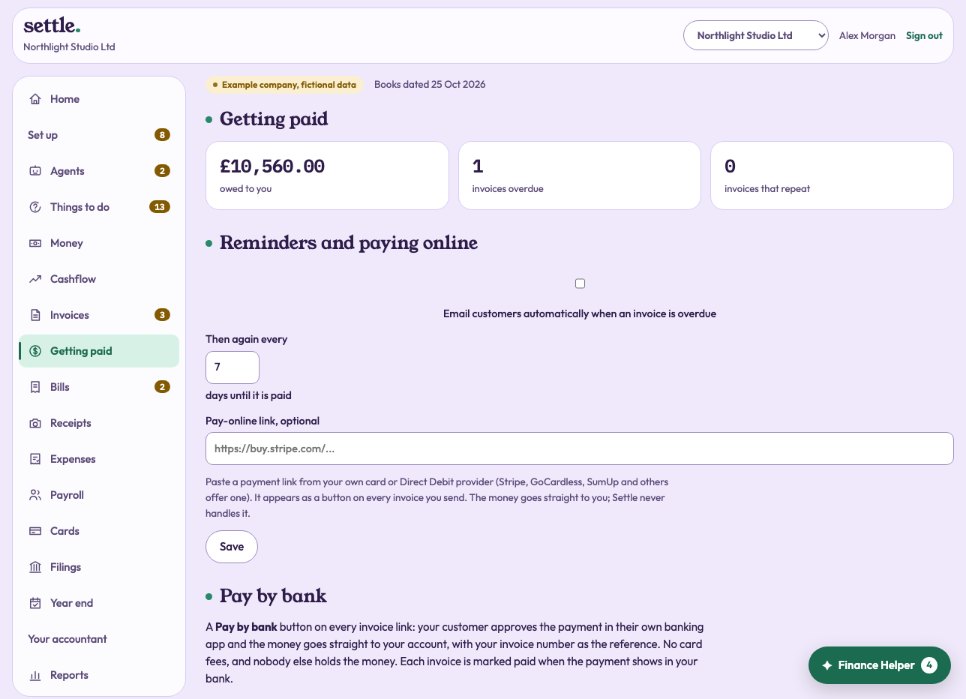
Tick Email customers automatically when an invoice is overdue, and choose how often to remind again (every 7 days unless you change it). Once a day, overdue invoices with an email address get a polite reminder. You can also press Send a reminder on any invoice.
When a customer disputes an invoice
Open the invoice and, under Chasing, press The customer disputes it and say what they dispute. Reminders and late charges stop, the Collections agent leaves it alone, and the customer’s link says it is being looked into, with no payment buttons. When it is sorted, choose how and press Settle the dispute; reminders resume.
Payment plans
Under Chasing, Agree a payment plan: two to twenty-four instalments that add up to what is still owed, starting today or later. Reminders then follow each instalment instead of the invoice, the customer’s link shows the next one, and by default no late charges are added while the plan is kept. If an instalment is missed, chasing resumes from its date.
Late payment interest and compensation
Between businesses, the Late Payment of Commercial Debts (Interest) Act 1998 lets you add simple interest at the Bank of England rate (on 31 December or 30 June, depending on when the invoice fell overdue) plus 8%, and fixed compensation of £40, £70 or £100 by the size of the invoice. Chasing shows the figures as at today; the owner can claim them as a separate invoice. It is never claimed for you, and not while an invoice is disputed or on a plan that waives it. Untick A business for a customer who is a person rather than a company.
Leaving a customer alone
Under How the customer is chased, untick Send reminders automatically for anyone you would rather chase yourself, and add a note such as when they usually pay.
Pay by bank
Under Getting paid, the owner adds the account customers should pay into and presses Save and switch on. Every invoice link then shows Pay by bank: the customer picks their bank, approves in their banking app, and the money goes straight to your account with the invoice number as the reference. No card fees, and nobody else holds the money. The invoice shows the payment on its way, and is marked paid when it reaches your bank. Being switched on: until it is on for your company, the button does not show.
A pay-online button
Paste a payment link from your own card or Direct Debit provider (Stripe, GoCardless, SumUp and others offer one). It appears as a button on every invoice. The money goes straight to you; Evenly never handles it.
Invoices that repeat
For retainers, rent and subscriptions: choose the customer, how often (every week, month, quarter or year), the first invoice date, days to pay, the lines, and whether to email each one. Press Start repeating. Each is raised by itself on the day; months that are closed are skipped. Stop at any time.
Still stuck? Ask in the Finance Helper inside the app, or contact your accountant.