Money out
Payroll
Pay your people each month, with payslips, and the run posted to the books.
Check before you pay
Payroll works out pay, tax, National Insurance, student loans and pensions from HMRC’s 2026 to 2027 figures, and posts each run to your books. It does not send anything to HMRC or your pension provider. Your accountant must check each run and file it with HMRC in recognised payroll software.
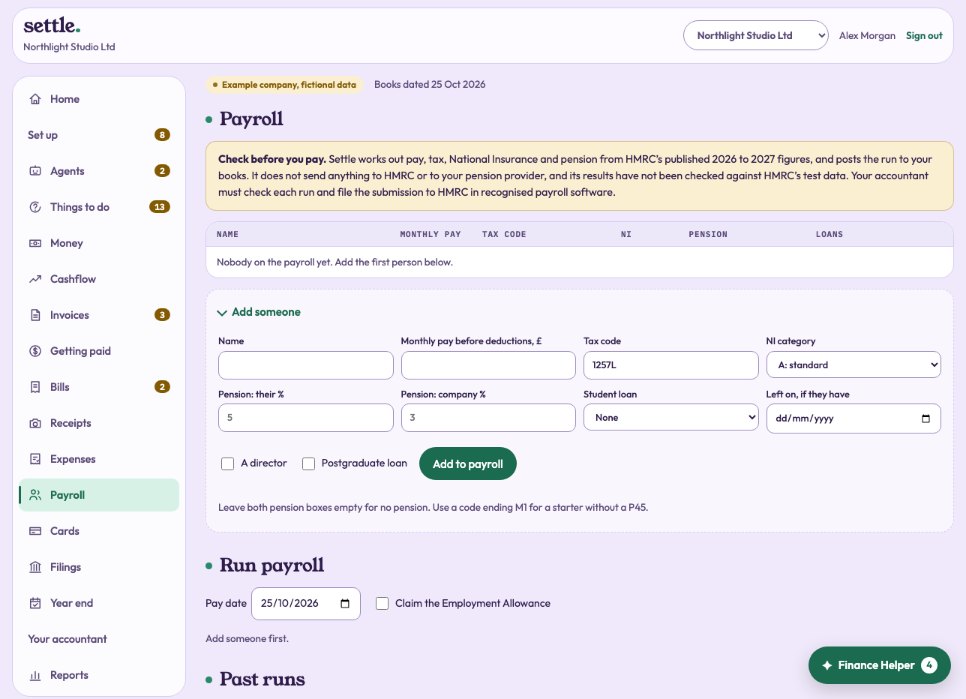
Adding someone
Under Add someone: their name, monthly pay before deductions, tax code (1257L unless you change it; use a code ending M1 for a starter without a P45), National Insurance category, pension percentages, student loan plan, and whether they are a director. Scottish and K tax codes are not supported yet.
Running payroll
Choose the pay date and, if the company can, tick Claim the Employment Allowance. Check the preview for each person (you can change the pay for this run only), then press Run payroll and post to the books. One run per month. The most recent run can be undone if its month is not closed.
Payslips and HMRC
Each run has printable payslips and the figures for the HMRC submission. Pay HMRC by the 22nd of the next month.
Still stuck? Ask in the Finance Helper inside the app, or contact your accountant.